Plug-and-Play and data-sovereign. All advantages and disadvantages under the microscope.
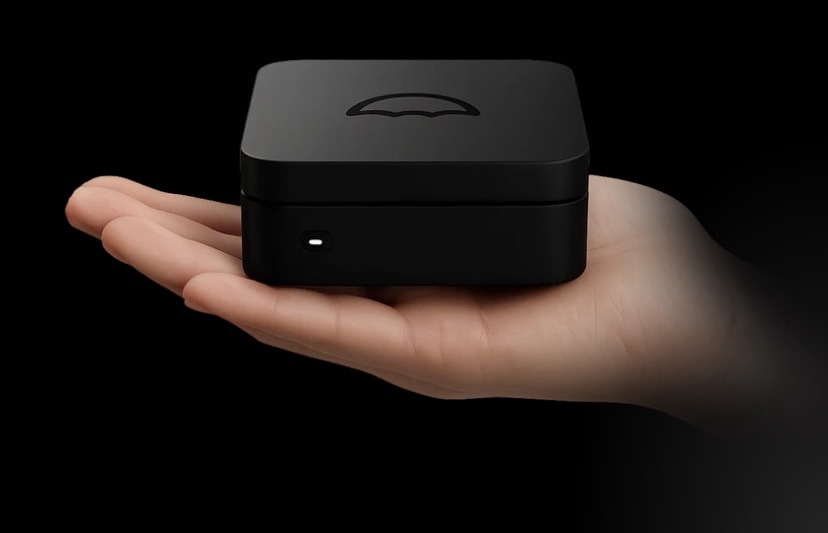
As someone who regularly tests technology products – from smart home devices and NAS systems to self-hosting solutions – I took a closer look at the Umbrel Home. It is a compact, pre-built home server from the manufacturer Umbrel that runs umbrelOS as its operating system. The device aims to make self-hosting accessible for beginners and advanced users alike, without requiring deep knowledge of Linux or Docker.
What is the Umbrel Home and what can you use it for?
The Umbrel Home is a palm-sized, energy-efficient home cloud server. You simply plug it in, connect it to your router via Ethernet, and access the interface through your browser at umbrel.local – done. No monitor or keyboard required.
Possible use cases:
- File and photo library: With apps like Nextcloud or Immich, you can store and sync files, photos, and videos locally.
- Media streaming: Plex or Jellyfin stream your movies and series to your TV, smartphone, or computer.
- Smart Home: Home Assistant or Homebridge automate your home.
- Bitcoin & Privacy: One-click Bitcoin and Lightning node, Mempool Explorer, and more.
- Additional tools: Password manager (Vaultwarden), ad blocker (Pi-hole), VPN (Tailscale), local AI models (Ollama/Open WebUI), and many more via the app store.
It is aimed at anyone who no longer wants to store their data with big cloud providers but doesn’t want the hassle of complicated DIY setups.
Why does it make you safer and more independent?
Today, many of us store our data on corporate servers – with all the risks of data breaches, outages, or price increases. The Umbrel Home brings the cloud back home:
- Data sovereignty: Your photos, documents, backups, and even your Bitcoin node stay within your own network. No unwanted analysis or sharing of your data.
- Independence from subscriptions: Instead of monthly cloud fees (iCloud, Google One, etc.), you make a one-time investment and save money in the long run.
- Resilience: In the event of major service outages or internet problems, you still have access to your local data.
- Privacy features: Tor support, 2FA, encrypted backups, and the option to keep everything local.
You retain full control – a real step toward greater digital self-determination.
Technical Specifications
Current specifications (as per official information):
- CPU: Intel N150 (Quad-Core, up to 3.6 GHz)
- RAM: 16 GB DDR5
- Storage: Optionally 512 GB, 1 TB, 2 TB, or 4 TB NVMe SSD (very fast)
- Ports: 3 × USB 3.0 (for external expansion), Gigabit Ethernet
- Wireless: WiFi and Bluetooth
- Operating System: umbrelOS (optimized for the device, browser-based)
- Power consumption: Very low (approx. 6–10 W TDP, actively cooled and quiet)
- Other: 1-year warranty, easy migration from Raspberry Pi setups possible
The hardware is significantly more powerful than a typical Raspberry Pi 4/5 and works well with multiple apps running simultaneously. The umbrelOS interface is modern, widget-based, and supports one-click installations and updates. Newer versions include features such as an integrated file manager and automated encrypted backups.
What’s good about the Umbrel Home?
- Simplicity: Setup in minutes. Perfect for beginners without server expertise.
- App ecosystem: The store offers hundreds of high-quality self-hosted applications – all with one click.
- Performance & Design: Fast, quiet, compact, and energy-efficient. The SSD storage options are future-proof for most users.
- Regular updates: The team is actively developing umbrelOS further (e.g., improved backups, new apps).
- Community & Support: Good documentation, forum, and direct support.
Many users report that they were able to cancel iCloud and similar services and now run everything locally.
What’s not so good?
- Price: Depending on the storage variant, it ranges from the high three-digit to low four-digit range. For pure enthusiasts, a self-built system (e.g., based on a mini PC or Raspberry Pi) can be cheaper – but with significantly more effort for setup and maintenance.
- Expandability: Compared to the larger “Umbrel Pro” (up to 32 TB, more slots), the internal options are limited. External USB storage helps, but NVMe is faster.
- RAM limit: 16 GB is sufficient for most scenarios but can become noticeable with many apps running simultaneously (e.g., large AI models + Bitcoin node + media server).
- Manufacturer dependency: Although umbrelOS has open-source elements, the best integration is with the manufacturer’s own hardware. For maximum freedom, DIY remains an alternative.
Conclusion: Is the Umbrel Home worth it?
If you value ease of use, high privacy, and a polished overall package, the Umbrel Home is a strong recommendation. It makes self-hosting accessible without forcing you to become a Linux admin. For tech enthusiasts with prior experience, a self-assembled system may be cheaper – but the comfort and polish of the Umbrel Home are hard to beat.
Do you really want to control your data yourself and move away from cloud subscriptions? Then the Umbrel Home is a solid entry point into your own home cloud. Check out the official site and consider which storage variant best suits your needs.
Learn more about the Umbrel Home directly from the manufacturer. The same goes for everything you need to know about UmbrelOS or its bigger sister, the Umbrel Pro.
Also check out our comparison between Umbrel Home and Umbrel Pro
Umbrel Home or Umbrel Pro? A Comparison
rendite.cloud – your finance blog
Affiliate Links. If you purchase one of the products we might receive a commision.


Kommentar verfassen