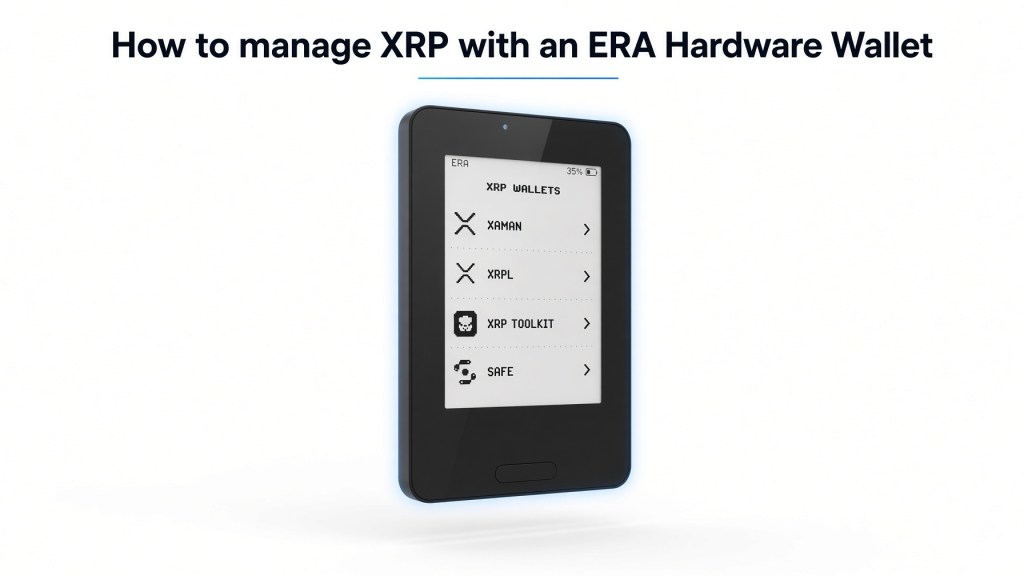
XRP holders who want self-custody without leaving keys on a phone or exchange have a growing list of hardware options. ERA Wallet is one of the newer air-gapped devices on that list. It is not an XRPL-native product in the same way Xaman is, but as of the June 2026 firmware release it does support XRP as a standalone Layer-1. That makes it a viable cold-storage signer for people who already hold XRP and want keys offline, human-readable transaction review, and a card-sized device that never uses USB, Bluetooth, or Wi-Fi.
This article explains whether XRP is supported, how the workflow actually works, what XRPL-specific details you must get right, and what else is worth knowing about the ERA hardware wallet itself.
What ERA Wallet Is
ERA Wallet is a credit-card-sized hardware signer made by HWLT FZE. The device stores private keys on-device, generates those keys locally, and signs transactions without ever connecting to a network. Communication with phones and computers happens through QR codes using the open EIP-4527 standard. Firmware updates and authenticity checks use NFC through the official companion app; transaction signing itself stays QR-only.
The product is built around three ideas that matter for any long-term XRP holder:
- Air-gapped signing. No USB, no Bluetooth, no Wi-Fi during signing. The attack surface that comes from a permanently connected cable or radio is removed.
- ERA Lens. The device tries to decode a transaction into readable fields (function, amount, destination) on the e-ink screen before you approve it. If it cannot decode the payload, it warns you instead of asking you to sign a hash you cannot interpret.
- Multiple independent wallets on one device. Up to 10 separate seed phrases can live on a single unit, so a long-term XRP vault can sit next to a trading or DeFi seed without mixing keys.
The hardware itself is a 54 × 87 × 5.5 mm aluminum-framed unit with a 2.7-inch e-ink display under Gorilla Glass 6, a front light, IP67 water and dust protection, wireless charging, and a long standby window. Three encrypted NFC recovery cards ship in the box.
Does ERA Wallet Support XRP?
Yes. XRP was added in ERA’s largest firmware update to date, announced on 25 June 2026. In that release the company listed XRP among new standalone Layer-1 networks alongside Cardano, Sui, and TON, plus Bitcoin-family coins (Litecoin, Dogecoin, Dash, Bitcoin Cash) and a large Cosmos-ecosystem batch. All of those networks were described as working fully air-gapped over QR.
Two practical caveats belong next to that “yes”:
- The public coins page on era-wallet.com has historically lagged firmware announcements. Treat the official firmware thread and subsequent coverage as the current source of truth, then confirm XRP appears in the Deposit list on your updated device.
- ERA is a signer, not a full XRPL client. Balances, destination-tag fields, trust lines, DEX orders, and account settings are handled by a linked software wallet. The hardware wallet holds the keys and approves what you see on its screen.
If your device is older than that June 2026 release, update firmware through the companion app over NFC before you move any XRP. Updates are cryptographically verified on-device.
How Managing XRP on ERA Actually Works
ERA never talks to the XRP Ledger directly. The flow is always:
- A software wallet constructs the XRPL transaction (payment, trust-set, account-set, and so on).
- That wallet presents a QR payload.
- ERA scans the payload, shows decoded details on the e-ink screen, and waits for physical confirmation.
- ERA returns a signed payload by QR.
- The software wallet broadcasts the signed transaction.
Private keys never leave the secure element path on the device. Linking a software wallet only exports public information so the app can watch addresses and prepare unsigned transactions.
That model is the same architecture used for Bitcoin and EVM chains on ERA. For XRP it is useful because XRPL transactions are compact and well-structured, which makes on-device review more meaningful than signing an opaque hash. How complete the human-readable decode is for every XRPL transaction type still depends on what ERA Lens knows for that payload. If a payload cannot be decoded, the device is designed to stop and flag it rather than proceed silently.
Choosing a companion software wallet
ERA works with wallets that speak EIP-4527 or ERA’s QR linking flow. Officially cited companions include MetaMask, Rabby, OKX, Bitget, imToken, TokenPocket, Trust Wallet, BlueWallet, Sparrow, Solflare, Backpack, Nunchuk, generic multi-chain QR linking, and, more recently, Guarda.
For XRP specifically, the companion must itself support the XRP Ledger. That immediately narrows the useful list:
- Guarda is the most relevant recent pairing. Guarda already supports XRP across web, desktop, mobile, and extension, and it published a dedicated ERA connection flow in August 2026. The integration started with selected chains and is expanding; confirm XRP signing in your Guarda build before you rely on it for sizeable transfers.
- OKX Wallet, Bitget Wallet, Trust Wallet, and TokenPocket are listed in ERA’s own linking docs and commonly expose XRP. Feature depth (destination tags, memos, issued tokens) varies by app and version.
- Xaman remains the strongest XRPL-native interface for trust lines, AMM/DEX, NFTs, and account flags. A confirmed first-party Xaman ↔ ERA pairing was not documented in ERA’s public help center at the time of writing. Do not assume Xaman hardware-signer support unless Xaman or ERA explicitly lists it.
The workable strategy for most holders is: use ERA as the offline key vault, and use a multi-chain wallet that already understands XRP r-addresses and destination tags as the daily interface.
Step-by-Step: Set Up ERA for XRP
1. Unbox, charge, and verify
Charge the device on the included wireless pad to at least about 70 percent. Complete the on-device authenticity check, then install any pending firmware and bootloader update through the companion app via NFC. Buy only from era-wallet.com. A hardware wallet is only as trustworthy as its supply chain.
2. Set the device PIN and create a wallet
Create a device PIN. Then create a new wallet on-device or import an existing seed or ERA recovery card. New wallets can be generated with up to five entropy sources: two hardware true-random generators plus optional camera, swipe, and motion input, with an on-device randomness quality check.
If this seed will hold a meaningful XRP position, create it as a dedicated wallet among the ten available slots. Keep a hot or DeFi seed separate.
3. Back up with NFC cards, not a screenshot
ERA ships three encrypted, PIN-protected NFC recovery cards rated for decades of storage. Use them. Paper is still possible, but the product’s intended backup path is the cards. Store shares in separate physical locations. Test that a card can restore access before you fund the wallet.
4. Link a software wallet that supports XRP
On the device: open the wallet → Settings → Link → choose the companion app. Scan the public-info QR with that app. Select XRP / XRPL if the linker asks you to pick chains.
5. Receive XRP
On ERA, open Deposit and select XRP once it appears in the chain list. The device shows the r-address and a QR. Send a small test amount first.
Important XRPL rules apply here regardless of which hardware you use:
- A new address is not a live account until it is funded. The current Mainnet base reserve is 1 XRP. Until that first payment lands, the account does not exist on ledger and cannot send.
- Self-custody receive addresses generally do not need a destination tag. Destination tags are for shared custodial addresses, mainly exchanges.
- After activation, additional ledger objects (trust lines, offers, escrows, signer lists, NFT pages) add an owner reserve, currently 0.2 XRP per object. Your spendable balance is total balance minus reserve minus the tiny transaction cost.
6. Send XRP
Build the payment in the software wallet. If you are withdrawing to an exchange, copy both the exchange r-address and the destination tag exactly. Missing or mistyped tags are one of the most common ways XRP “disappears” into an exchange’s omnibus account. Review amount, destination, and tag on the ERA screen before you approve. Then broadcast from the software wallet.
Start with a tiny payment. Confirm it on a block explorer, then move the rest.
What Else You Need to Know About XRP on a Hardware Signer
Destination tags are not optional when the receiver is an exchange. Personal ERA-controlled accounts do not require a tag to receive. Exchange deposit screens almost always do. The software wallet must expose that field; the hardware wallet must display it. If either layer hides the tag, do not send.
ERA will not magically give you full XRPL DeFi. Trust lines, issued currencies, AMM deposits, NFT offers, hooks, and account flags live in the companion app’s feature set. If you need those tools daily, a dedicated XRPL wallet such as Xaman (optionally paired with a hardware product that Xaman officially supports) is still the more complete interface. ERA’s value for many holders is cold storage of native XRP plus air-gapped approval of simple payments.
Issued tokens are a separate decision. Holding an IOU on XRPL requires a trust line and extra reserve. Confirm that your companion wallet can create and sign TrustSet transactions through ERA before you treat the setup as a token wallet.
Firmware age matters more than marketing pages. XRP support arrived in a specific 2026 release. An un-updated unit will not behave like the announcement. Check Settings → Updates on the device.
Quick Sign helps if you run multiple seeds. The same firmware update added Quick Sign so the device can pick the correct one of up to ten seeds instead of forcing a manual wallet hunt every time you approve a transaction. That is useful if XRP lives on wallet 3 and Ethereum lives on wallet 1.
General ERA Wallet Notes That Matter for Any Asset
These points are not XRP-specific, but they determine whether the device is a good home for XRP.
Air gap is real, with one nuance. Signing is QR-only. NFC is used for recovery cards, firmware, and authenticity checks. That is a smaller radio surface than Bluetooth signing wallets, but NFC is still a physical interface. Keep the companion app official and the phone itself reasonably clean.
ERA Lens is the headline security feature. Blind signing has been an expensive failure mode in DeFi. ERA’s pitch is on-device decoding without depending on an online registry. That helps most on EVM contracts; on XRPL it is most useful when the decoded payment fields (amount, destination, tag/memo) are shown clearly. If the screen shows something you did not intend, refuse the signature.
Ten seeds on one brick is convenient and a single point of physical failure. Separate seeds reduce software and operational mix-ups. They do not replace a second backup location. If the device is lost and the NFC cards are in the same drawer, you still have a problem.
Bitcoin-only firmware exists. You can switch the device to a Bitcoin-only image to shrink the codebase. That mode will not help an XRP holder. Stay on multichain firmware if XRP is a requirement.
Openness is partial. The companion app is published; firmware openness has been described as staged behind patent work. An independent Keylabs audit is part of the public story. That is better than no audit and weaker than a fully reproducible open firmware stack. Read the audit and decide whether that trade-off fits your threat model.
Physical design is a genuine advantage. Card format, e-ink with a front light, IP67, and wireless charging make the device easy to store in a safe or travel pouch. E-ink is also harder to shoulder-surf than a bright OLED phone.
Languages currently include English, German, and Russian. That is relevant if you share operational notes with family members who need to recover funds later.
Do not import a previously exposed seed and call it cold storage. If an XRP seed ever lived in Xaman on a phone, in a browser extension, or in an exchange export, moving it onto ERA does not un-expose it. Generate a new seed on ERA and transfer coins.
How ERA Compares for XRP Holders
Ledger and Trezor remain the default answers in most “best XRP hardware wallet” roundups because their XRP apps have been stable for years and pair cleanly with Xaman or their own suites. Tangem cards are the other common XRPL hardware path because Xaman supports them directly.
ERA’s differentiators are the air-gapped QR path, on-device decoding, multi-seed design, and NFC card backups. Its gap, today, is ecosystem maturity on XRPL: fewer years of XRP-specific edge-case testing, companion-app dependency, and less documentation for trust lines and advanced account objects than the Ledger/Xaman combination.
For a holder whose goal is “keep a large XRP balance offline and send it a few times a year,” ERA is a reasonable option once firmware is current and a test transaction has succeeded. For a holder who lives in XRPL DEX, AMM, and issued-asset workflows, ERA is a signing layer at best, not a replacement for an XRPL-native wallet.
Practical Security Checklist
- Buy from the official store and run the authenticity check.
- Update firmware before first funding.
- Create a new seed on-device for XRP you care about.
- Write nothing into a cloud note. Use the NFC cards and geographically split them.
- Activate the account with a small payment that covers the 1 XRP base reserve plus a buffer.
- Test receive and send with an amount you can afford to lose.
- When paying an exchange, verify destination tag on both the software wallet and the ERA screen.
- Keep a second recovery path. One device plus three cards in one location is not a disaster plan.
- Re-check companion-wallet XRP support after every major app update. Hardware support can exist while a specific software wallet still mishandles tags.
Frequently Asked Questions
Can I store XRP only, with no other coins?
Yes, in practice. Create one of the ten wallets, link only an XRP-capable app, and ignore other chains. There is no XRP-only firmware image; the Bitcoin-only image would remove XRP.
Does ERA show destination tags?
It must, for exchange withdrawals to be safe. Confirm on a tiny test send. If your companion wallet omits the tag in the QR payload, change wallets rather than guessing.
Can I stake XRP on ERA?
Native XRP has no protocol staking. Yield products that wrap or lock XRP live on other networks or through third-party programs. Those are separate transactions with separate risks. Do not treat a hardware wallet as a yield product.
What if I already have XRP on an exchange?
Withdraw to the ERA-controlled r-address after the account is activated. No destination tag is required for that receive. Keep enough XRP on the exchange only if you still need it there for trading.
What if the device dies?
Restore from NFC cards or from the seed you generated during setup onto a new ERA or any wallet that can import that mnemonic and derive the same XRPL account. Verify derivation before you assume the address will match.
Bottom Line
ERA Wallet does support XRP. Support arrived with the June 2026 multichain firmware expansion and works the same way the rest of the device works: keys stay offline, a software wallet prepares the XRPL transaction, and ERA approves a decoded payload over QR.
That is enough for disciplined cold storage if you update the device, pick a companion wallet that handles r-addresses and destination tags correctly, respect the 1 XRP reserve, and test before you move size. It is not yet a reason to abandon an XRPL-native stack if you depend on trust lines, the DEX, or Xaman-specific account tools.
Treat ERA as an air-gapped signer with unusually strong backup hardware and transaction-review UX. Used that way, it can hold XRP safely. Used as if it were a full XRPL wallet by itself, it will frustrate you. The difference is entirely in how you pair it and how carefully you handle the ledger’s own rules.
If you want to buy an ERA hardware wallet you can use code FPORTAL10 for a 10% discount.
Read more about ERA
rendite.cloud – your finance blog
Affiliate Links. If you purchase one of the products we might receive a commission.


Kommentar verfassen